A muffled phone speaker can turn your favorite music into a distant whisper. The good news? You don’t need fancy tools or a technician to fix it. You can clean your phone speaker at home safely, quickly, and effectively, if you follow the right methods.
Let’s walk through practical, tested ways to fix muffled phone speaker issues using simple tools you already have.
Why does your phone speaker sound muffled?
Before fixing anything, understand the cause. A clear reason helps you avoid making the problem worse.
Most smartphones collect dust, lint, and debris over time. These particles block tiny speaker holes and reduce sound clarity.
Here are the most common reasons:
- Dust buildup from pockets and bags
- Moisture or water exposure
- Oil and dirt from fingers
- Fabric lint clogging speaker grills
- Accidental drops affecting internal components
If your sound feels low, distorted, or unclear, chances are high that debris is the culprit.
Can you fix muffled phone speaker at home safely?
Yes, you absolutely can. In most cases, external cleaning solves the issue.
However, keep this in mind:
- Avoid opening your phone unless you know what you’re doing
- Never use sharp objects inside speaker holes
- Avoid excessive liquid
Simple cleaning methods work surprisingly well. You just need patience and a gentle approach.

How to clean smartphone speaker dust easily (step-by-step)
Let’s start with the safest and most effective cleaning techniques.
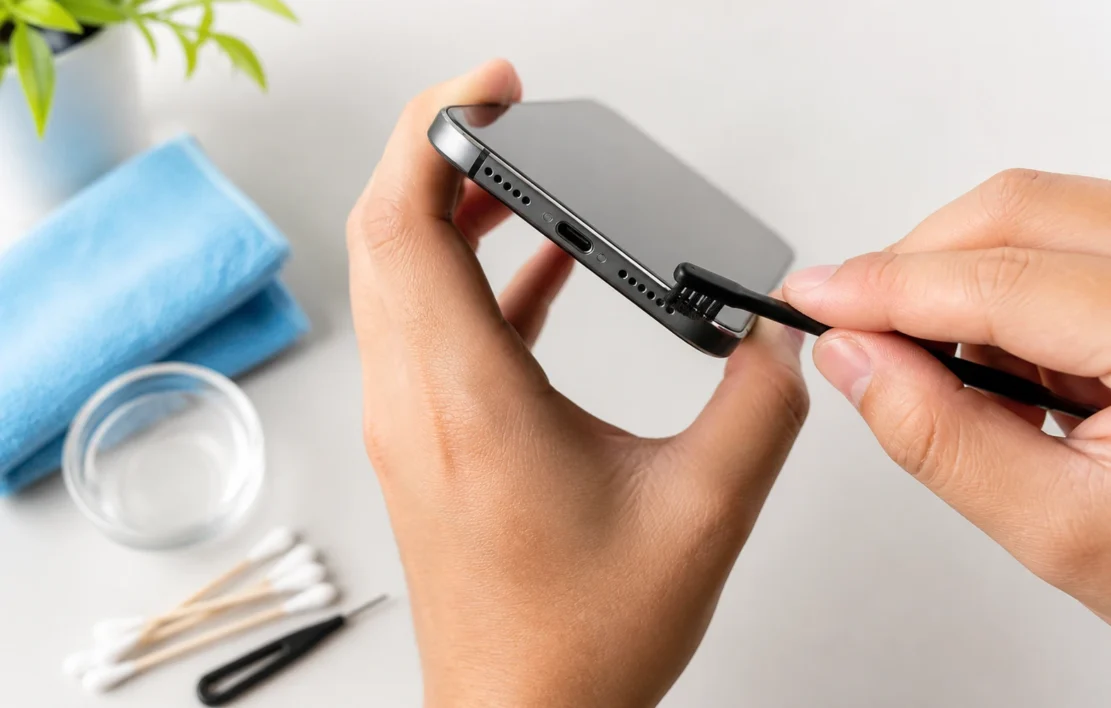
1. Use a soft-bristled toothbrush
This is one of the easiest and most reliable methods.
Steps:
- Take a clean, dry toothbrush
- Gently brush over the speaker grill
- Move in small circular motions
- Keep the phone tilted downward so dust falls out
This method works well because soft bristles loosen dirt without damaging the speaker.
Pro tip: Don’t press too hard. Gentle strokes do the job better.
2. Try the tape method for stubborn dirt
Sticky tape can pull out fine particles that brushing might miss.
Steps:
- Take a small piece of masking or painter’s tape
- Lightly press it over the speaker area
- Peel it off slowly
Dust sticks to the adhesive and clears the holes.
Avoid strong tapes like duct tape. They can leave residue behind.
3. Use compressed air carefully
Compressed air helps remove deep dust, but only if used properly.
Steps:
- Hold the can at a distance (not too close)
- Use short bursts of air
- Angle the airflow to push debris outward
Never blast air directly into the speaker at close range. That can push dirt further inside.
4. Clean mobile speaker without opening phone using a brush + air combo
This method combines two effective techniques.
- First, loosen debris with a toothbrush
- Then use light air bursts to remove it
This combo improves results significantly, especially for older phones with heavy buildup.
How to remove dirt from phone speaker holes without damage
Speaker holes look small, but they’re delicate. You need precision.
What works best:
- Soft brush
- Gentle tape
- Light air pressure
What to avoid:
- Pins or needles
- Toothpicks (too hard and sharp)
- Water or cleaning sprays
If you poke inside, you risk damaging internal components permanently.
DIY phone speaker cleaning tips that actually work
Let’s go beyond basics and cover smart tricks that people often overlook.
Use a clean makeup brush
A makeup brush works even better than a toothbrush in some cases.
- Ultra-soft bristles
- Reaches tiny gaps
- No risk of scratching
It’s perfect for delicate cleaning.
Use sound vibration apps (for dust or water)
Certain apps play high-frequency sound waves. These vibrations can push out dust or moisture.
They work best for minor blockages.
Search for “speaker cleaning sound” apps and play them at full volume for a few minutes.
Clean regularly, not just when it gets bad
Most people wait until sound quality drops. That’s a mistake.
Light cleaning once a week prevents buildup and keeps your audio crisp.


Remove water from phone speaker sound issue
Water can distort sound badly. If your phone got wet, act fast.
What to do:
- Turn off the phone immediately
- Dry the exterior with a cloth
- Place the phone in a dry, ventilated area
- Use silica gel packs if available
Avoid the “rice trick.” It’s not very effective and can introduce dust.
Use sound to eject water
High-frequency sound can help push water droplets out.
Play a water-ejection tone for a few minutes.
You might notice improved clarity right away.
Phone speaker cleaning with toothbrush method: does it really work?
Yes, it works and it’s widely recommended.
The reason is simple:
- Soft bristles dislodge dirt
- No risk of internal damage
- Easy to control pressure
It’s the safest starting point for cleaning.
If your speaker still sounds muffled after brushing, combine it with tape or air.
How to fix low volume speaker problem without tools
Sometimes, the issue isn’t dirt, it’s settings.
Check these first:
1. Volume settings
Make sure media volume is at maximum.
2. Sound enhancements
Disable equalizers or sound modifiers that reduce clarity.
3. Bluetooth connections
Your phone might be connected to another device.
4. Software glitches
Restart your phone. It solves many hidden issues.


Improve phone sound quality at home with simple tweaks
Cleaning helps, but optimization makes a difference too.
Keep speaker grills uncovered
Cases or covers sometimes block sound output.
Avoid using phone on soft surfaces
Beds or cushions absorb sound.
Update your software
Updates often fix audio bugs.
When should you avoid DIY cleaning?
Not every issue can be fixed at home.
Watch out for these signs:
- Crackling or distorted sound even after cleaning
- No sound at all
- Sound cuts in and out
These may indicate hardware damage.
In such cases, professional repair is the better option.
Common mistakes that make things worse
Let’s clear up some risky habits.
Using water directly
Liquid can seep inside and damage components.
Blowing air with your mouth
Moisture from breath makes things worse.
Using sharp tools
You can puncture speaker membranes.
Over-cleaning aggressively
Too much force damages delicate parts.
How often should you clean your phone speaker?
A simple rule:
- Light users: once every 2–3 weeks
- Heavy users: once a week
If you carry your phone in your pocket daily, lint builds up faster.
Signs your speaker needs cleaning
Not sure if cleaning is necessary?
Look for these clues:
- Sound feels dull or blocked
- Volume seems lower than usual
- Music lacks clarity
- Calls sound distant
If you notice any of these, it’s time to clean your smartphone speaker dust easily.
Can cleaning really restore full sound quality?
In most cases, yes.
Dust and debris act like a physical barrier. Once removed, sound waves travel freely again.
You’ll notice:
- Louder output
- Clearer vocals
- Better bass response
It’s a simple fix with a big impact.
Frequently Asked Questions
How do I fix a muffled phone speaker at home?**
You can fix a muffled phone speaker by gently cleaning the speaker grill using a soft toothbrush, tape, or compressed air. Avoid water and sharp objects to prevent damage.
What is the safest way to clean phone speaker holes?
The safest way is to use a dry, soft-bristled brush or a clean makeup brush. Light brushing removes dust without harming internal components.
Can dust cause low volume in phone speakers?
Yes, dust and lint can block speaker holes, reducing sound output and clarity. Cleaning the speaker often restores normal volume.
How can I remove water from my phone speaker?
Turn off your phone, dry it externally, and use sound vibration apps to push water out. Let the device air-dry completely before using it again.
Can I clean my phone speaker without opening the phone?
Yes, most cleaning methods like brushing, tape, and air work externally. You don’t need to open your phone in most cases.
Why does my phone speaker sound low even after cleaning?
If sound stays low, the issue may be due to software settings, moisture damage, or internal hardware problems.
Is it safe to use a toothbrush to clean phone speakers?
Yes, a clean, dry toothbrush is safe if used gently. It helps remove dirt without damaging the speaker.
How often should I clean my phone speaker?
You should clean your phone speaker once every 1–2 weeks if you use your phone daily or keep it in your pocket.
Do speaker cleaning apps really work?
Speaker cleaning apps can help remove minor dust or water using sound vibrations, but they won’t fix heavy dirt buildup.
What should I avoid while cleaning phone speakers?
Avoid using water, sharp tools, strong air pressure, or blowing air with your mouth, as these can damage the speaker.
Final thoughts
Fixing a muffled phone speaker at home isn’t complicated. You just need the right method and a bit of care.
Start with the toothbrush method. Add tape or air if needed. Avoid risky shortcuts. And clean regularly to prevent future issues.
Your phone’s speaker works hard every day. A little maintenance keeps it sounding sharp, loud, and clear.
Now you know exactly how to clean phone speaker muffled sound at home, no technician required.