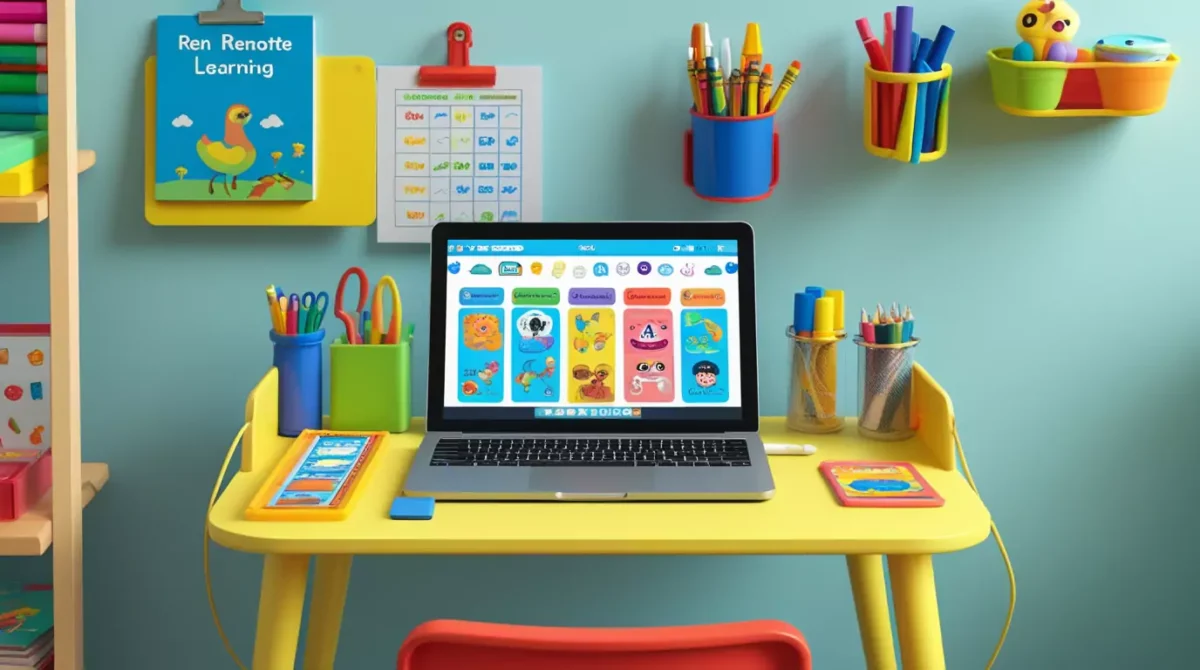
Remote classes, digital homework, and online learning apps turned many homes into mini classrooms. A messy setup can distract kids fast. Tangled chargers, hanging wires, and overloaded power strips also create safety problems. Smart cable management keeps the learning area clean, safer, and easier to use every day.
A well planned remote learning station using cable management also saves time. Kids find chargers faster, parents clean desks faster, and devices stay in better condition. If your child studies at home often, cable organization matters as much as a good chair or proper lighting.
Why does cable management matter in a kids remote learning desk organization setup?
Kids move around a lot during study sessions. Loose wires slide off desks, wrap around chairs, and collect dust under tables. A cluttered setup can break focus in minutes.
Research from the Princeton Neuroscience Institute found that visual clutter competes for attention and reduces focus. Cleaner spaces support better concentration. That matters during math lessons and spelling quizzes. It also matters when your child already wants to pet the dog instead of opening Google Classroom.
Cable management also improves safety. The Electrical Safety Foundation International warns that damaged cords and overloaded outlets increase fire and shock risks in homes. Kids often pull cables hard without noticing damage.
A cleaner desk setup gives children:
- More workspace for books and notebooks
- Faster access to devices
- Fewer distractions
- Better posture
- Safer charging habits
Parents usually notice another bonus too. Vacuuming around the desk stops feeling like an obstacle course.
What should you include in a remote learning station storage ideas plan?
Before buying organizers, look at what your child actually uses each day.
Most online learning setups include:
- Laptop or tablet
- Monitor
- Keyboard and mouse
- Headphones
- Desk lamp
- Chargers
- Printer
- School supplies
Every extra device adds another cable. Start by removing anything your child does not use weekly.
This step matters because fewer wires create fewer problems. A second monitor sounds productive until your 8 year old uses it to watch cat videos during science class.


How do you organize kids online learning setup without making it complicated?
Simple systems work best for children.
A setup with too many organizers, labels, and rules usually falls apart after a week. Kids need fast routines they can repeat easily.
Start with these basics:
Group cables by purpose
Keep learning device wires together. Keep entertainment device wires separate.
For example:
- School laptop charger
- Monitor cable
- Headphone cable
Stay in one group.
Gaming console cables belong somewhere else.
This small change makes troubleshooting easier when something disconnects before class starts.
Use short cables whenever possible
Long cords create loops and tangles. Measure the distance between the outlet and the desk before buying replacements.
Shorter cables reduce clutter immediately.
Label important cords
Small cable labels help parents and kids reconnect devices correctly. You can use simple sticker tags or color coded clips.
A child pulling random cords from a power strip at 7:55 AM rarely ends well.
Which kid friendly cable management solutions work best?
Some cable tools work better for families than others. Choose products that are simple, durable, and safe around children.
Cable clips
Cable clips attach to desk edges and hold charging wires in place.
They stop chargers from falling behind furniture every night. This saves surprising amounts of time during busy mornings.
Cable sleeves
Cable sleeves wrap multiple wires together into one bundle.
They reduce visual clutter and prevent tangling under desks. Sleeves also make the area easier to clean.
Cord boxes
Cord boxes hide power strips and extra cable length.
These boxes help keep younger children away from outlets and reduce the temptation to unplug random things “just to see what happens.”
Velcro cable ties
Velcro ties work better than zip ties for homeschool cable organization tips because parents can adjust them quickly.
You can reuse them many times without cutting anything.
Under desk cable trays
Cable trays mount under the desk and hold wires out of sight.
They work especially well for permanent learning stations with monitors and printers.
How can you create a clean homeschool desk setup in a small room?
Not every family has a separate study room. Many kids study in bedrooms, kitchens, or shared living spaces.
A small learning area needs smart storage choices.
Use vertical storage
Wall shelves free up desk space quickly.
Store:
- Books
- Chargers
- Headphones
- Art supplies
Above the desk instead of on it.
Mount power strips safely
Keep power strips off the floor when possible.
Wall mounted or under desk mounted strips reduce tripping hazards and keep cables organized.
Choose furniture with built in storage
Desks with drawers or side shelves reduce visible clutter.
Storage cubes also work well for shared homeschool spaces.
Add a charging station
A dedicated charging area prevents devices from spreading across the house.
Keep tablets, headphones, and laptops in one place overnight.
Parents spend enough time searching for missing socks already.
What are the best cable management ideas for kids study space?
Some setups work better because they match how children actually behave.
Kids pull, twist, unplug, and move things constantly. Flexible systems survive longer than perfect looking systems.
Here are practical ideas that hold up well in real homes.
Create a cable path
Guide cables along one side of the desk.
This keeps the center workspace open for writing and crafts.
Keep floor cables covered
Use floor cord covers if wires cross walking areas.
This matters in shared spaces where people move often.
Separate charging and work areas
Charging stations create clutter fast.
Keep charging devices slightly away from the main study surface when possible.
Use wireless accessories carefully
Wireless keyboards and mice reduce clutter.
Still, they need charging eventually. Keep charging cables nearby in a labeled drawer.
Rotate seasonal supplies
Kids rarely need every school supply at once.
Store extra materials separately to keep the learning station clean.
How do homeschool cable organization tips improve productivity?
Children focus better when they know where things belong.
A structured workspace reduces small interruptions during lessons. Kids waste less time searching for chargers, untangling headphones, or clearing desk space.
Researchers from the University of California found that clutter can increase stress and reduce the ability to focus on tasks. Organized spaces support calmer work sessions.
Good organization also builds habits children carry into later school years.
Simple routines matter:
- Return headphones after class
- Wrap chargers neatly
- Clear the desk each evening
- Store papers in labeled trays
Children usually follow routines better when parents keep the setup simple and visible.
Which DIY cable organization for study desk ideas actually work?
You do not need expensive accessories to organize a learning station.
Many low cost DIY methods work well.
Binder clips for charging cables
Attach binder clips to the desk edge and thread charging cords through the metal loops.
This keeps cables accessible.
Toilet paper rolls for spare cords
Store extra cables inside labeled cardboard rolls in a drawer.
It looks surprisingly tidy for something that started in the recycling bin.
Shoe boxes for device storage
Decorated shoe boxes work well for storing tablets, chargers, and school accessories.
Kids can personalize them easily.
Adhesive hooks under desks
Small adhesive hooks guide wires underneath desks without drilling holes.
These work well in apartments or rental homes.
Bread tags as cable labels
Plastic bread tags can label chargers quickly.
Write device names with a permanent marker.
Cheap. Effective. Slightly nostalgic.
What mistakes should parents avoid with wire management for kids study station?
Many desk setups become messy again because the system feels hard to maintain.
Avoid these common problems.
Too many devices
Extra screens and gadgets increase clutter quickly.
Keep only necessary learning tools on the desk.
Loose power strips
Power strips sliding across the floor create tangled cords.
Secure them properly.
Ignoring cable length
Cords that are too long pile up behind desks.
Measure first before buying replacements.
Poor lighting placement
Desk lamps often create extra cable clutter.
Position lamps close to outlets when possible.
Overcrowded drawers
Stuffed drawers make organization harder.
Leave some empty space so children can store items easily.
How can you organize a shared homeschool learning station?
Many families share one study area between siblings.
Shared spaces need stronger organization systems because multiple devices create more cables and confusion.
Assign each child a color
Use colored cable ties, folders, and storage bins.
Kids identify their own supplies faster.
Give each child a device zone
Separate workspaces reduce accidental unplugging and arguments.
Arguments still happen. Just slightly fewer of them.
Create individual charging spots
Each child should have a dedicated charger location.
This reduces missing cables and battery emergencies before class.
Store headphones separately
Headphones tangle quickly when stored together.
Hooks or labeled bins help.
What furniture works best for kids remote learning desk organization?
The desk itself affects cable management more than many parents expect.
A desk with no storage or cable access points becomes messy quickly.
Look for desks with:
- Cable holes or grommets
- Built in shelves
- Drawers
- Adjustable height
- Enough depth for writing and devices
An ergonomic chair also matters. The American Academy of Pediatrics recommends child friendly workspaces that support posture during screen time and school activities.
Kids should sit with:
- Feet supported
- Screens near eye level
- Elbows relaxed
- Enough desk space for writing
Good posture reduces fatigue during long lessons.
How do you maintain a clean homeschool desk setup long term?
Organization works best when maintenance stays easy.
You do not need a perfect Pinterest desk every day. You need a setup your child can reset in 5 minutes.
Create a daily reset routine
At the end of each school day:
- Put supplies back
- Plug in devices
- Throw away trash
- Wipe the desk
- Straighten cables
Small resets prevent large messes.
Review the setup monthly
Children’s school needs change during the year.
Remove unused supplies and adjust storage when needed.
Replace damaged cords immediately
Frayed chargers create safety risks.
Inspect cables regularly, especially around younger children.
Keep cleaning supplies nearby
Disinfecting wipes or microfiber cloths help maintain the workspace quickly.
Sticky desks appear faster around children who snack during online class. Somehow peanut butter reaches places science still cannot explain.
Which low competition homeschool organization keywords fit naturally into content?
Parents often search for very specific setup problems. Long tail search phrases help articles appear in targeted searches.
Examples include:
- homeschool desk cable clutter solutions
- small space online school setup
- child safe desk cable organization
- study desk cord storage for kids
- online class desk setup ideas
- cable management for homeschool families
- simple kids study desk organization
- homeschool workstation setup tips
Use these phrases naturally across headings and body content instead of repeating one keyword excessively.
How can parents make the learning station more comfortable for kids?
Cable management improves comfort because clean spaces feel easier to use.
Add a few practical comfort upgrades:
Use proper lighting
Natural light works well during daytime study sessions.
Position screens to reduce glare.
Keep frequently used items within reach
Children lose focus when they stand up constantly for supplies.
Store pencils, notebooks, and chargers nearby.
Add simple desk organizers
Small trays and pencil holders reduce visual clutter.
Control noise levels
Headphones help in shared households.
Store them on hooks or stands to avoid cable tangles.
Why does a clutter free learning setup support better study habits?
Children often mirror their environment.
A clean workspace encourages better routines and fewer distractions during online lessons.
Organized learning stations also reduce stress for parents. Morning school prep becomes faster when chargers stay connected and supplies stay visible.
Cable management may sound small, yet it changes how the entire study area feels and functions. Kids can focus on assignments instead of hunting for tangled cords under the desk.
That alone makes the effort worth it.
Frequently Asked Questions
How do you organize cables for a kids’ study desk?
Use cable clips, Velcro ties, and under desk trays to keep charging wires organized and out of reach. Label cables clearly so kids can identify devices easily during online classes.
What is the best setup for a remote learning station?
A good remote learning station includes a comfortable chair, proper lighting, organized storage, minimal distractions, and effective cable management for devices and chargers.
Why is cable management important for kids’ learning spaces?
Cable management improves safety, reduces clutter, prevents tangled wires, and helps children stay focused during remote learning sessions.
How can I hide charging cables on a study desk?
You can hide charging cables using cable sleeves, adhesive clips, under desk trays, and storage boxes designed for power strips and adapters.
What are the best cable management tools for home study setups?
Popular cable management tools include cable clips, cable sleeves, Velcro ties, cable trays, cord organizers, and desk grommets for cleaner wire routing.
How do I keep my child’s learning station clutter free?
Use vertical storage, labeled containers, dedicated device zones, and regular desk cleaning routines to maintain an organized learning environment.
Can organized study spaces improve focus for kids?
Yes, organized learning spaces reduce visual distractions and help children concentrate better during online classes and homework sessions.
How do you organize a small remote learning space?
Use compact desks, wall shelves, wireless accessories, and hidden cable organizers to maximize space in smaller rooms or shared areas.
What safety tips should parents follow for remote learning setups?
Keep liquids away from electronics, avoid overloaded power strips, secure loose floor cables, and use surge protected outlets for safer learning stations.
How often should you reorganize a kids’ study station?
Review and reorganize the setup every few months to remove unused items, replace damaged cables, and adjust the space as your child’s learning needs change.
Final Thoughts
Learning how to organize kids’ remote learning station using cable management can transform a chaotic setup into a productive and comfortable space. You do not need expensive furniture or complicated systems. Small changes often create the biggest improvements.
Start with the basics:
- Organize cables
- Reduce clutter
- Improve accessibility
- Create clear device zones
- Prioritize safety
A well organized learning station helps children focus, protects technology, and makes daily routines smoother for the entire family.
And perhaps most importantly, it prevents headphone cables from forming mysterious knots overnight like they attended secret ninja training sessions while everyone slept.